Create Your First AI Video Content
Create Your First AI Video Content
Video ads, reels, and talking-head content without a studio. No expensive equipment. No editing degree. Just your phone and AI.

"The first video is always the hardest. The second is 50% easier. By the tenth, you will not remember why you were afraid."
Kill the Fear of Video
Most business owners avoid video because they believe it requires expensive equipment, a studio, or professional editing skills. That belief is costing you customers.
"AI has cut average production costs by 40%. A social media video that cost $1,600-$5,500 traditionally now costs $110-$550 with AI tools."
What You Actually Need (Not What You Think)
Your Phone
Any smartphone from 2019 onward shoots 1080p. That is broadcast quality.
Natural Light
Face a window. Morning light is best. No ring light needed.
A Stack of Books
Phone tripod. Cost: ₦0. Stack books, lean phone against wall.
CapCut (Free)
Auto-captions, cuts, music, effects. Works offline. Zero cost.

"You do not need a studio. You need a window, a phone, and something worth saying."
Do This Right Now
Pick up your phone. Open the camera app. Switch to video mode. Record yourself saying your business name, what you sell, and one problem you solve. Do not stop, do not restart. That 30-second clip is your first draft. Save it. We will improve it together.
The 60-Second Script Formula
Every viral short-form video follows the same structure. Learn the formula once. Use it forever.
The Hook
First 3 seconds decide everything. Start with a question, a bold claim, or a visual surprise. "I spent ₦50,000 on ads and learned this..."
The Problem
Name the pain your audience feels. Be specific. "Most small businesses in Lagos waste money on ads that never convert."
The Solution
Show (don't just tell) how you solve it. Quick demo, before/after, or testimonial snippet. "Here is what changed when I used AI targeting..."
The CTA
Tell them exactly what to do next. One action only. "Follow for more. DM 'BRAND' for the free checklist. Link in bio."
Copy-And-Paste Script Template
"[Shocking stat or question] — Did you know 70% of Nigerian businesses lose money on ads because of one mistake?"
"Most business owners target everyone. But your product is not for everyone. It is for someone specific. When you target everyone, you reach no one."
"I changed one thing: I started targeting only women in Lekki aged 25-34 interested in skincare. My ad cost dropped 60%. My sales tripled. Here is the exact audience setting..."
"Save this. Share it with a business owner who needs it. Follow for Day 4 — I will show you how to automate your entire ad system."
Film Like a Pro on a ₦0 Budget
Position Yourself
Sit 2 arm-lengths from the camera. Eye level with the lens. Look slightly above the camera, not at the screen.
Use the Back Camera
Your phone's back camera is 2-3x better than the front. Use a mirror behind the phone to see yourself, or ask someone to press record.
Record in Portrait (9:16)
78% of video views are on smartphone. Vertical video fills the screen. Horizontal video gets ignored on mobile feeds.
Shoot 3 Takes
Record the same script 3 times. Most people hate their first take. The third is usually the best. You only need one good take.
Nigeria-Specific Tip
Film during generator hours or early morning for consistent lighting. Background noise? CapCut's AI noise removal cleans audio in one tap. No external mic needed.
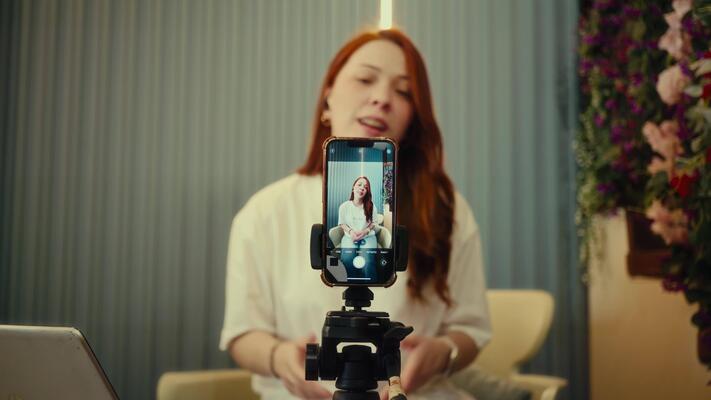
The ₦0 Studio Setup
- →Phone: Any smartphone with 1080p video
- →Tripod: Stack of books or ₦500 phone stand from Jumia
- →Light: Window facing you, morning or late afternoon
- →Background: Clean wall, bookshelf, or branded backdrop
- →Audio: Phone mic + CapCut AI noise removal
Edit with AI — Minutes, Not Hours
These tools handle captions, cuts, music, and effects automatically. Pick based on your content type and budget.
CapCut
- • Auto-captions in 10+ languages
- • One-tap background removal
- • AI noise reduction
- • Trending effects & templates
- • Works offline after download
Descript
- • Edit video by editing text
- • 95% transcription accuracy
- • Auto filler-word removal
- • AI voice cloning (Overdub)
- • Export to Premiere/Final Cut
HeyGen
- • 120+ AI avatars
- • 175+ language translation
- • Lip-sync dubbing
- • Voice cloning
- • No camera needed
Runway
- • AI video generation (Gen-3)
- • Green screen removal
- • Motion tracking
- • Inpainting & effects
- • Professional VFX
| Feature | CapCut | Descript | HeyGen | Runway |
|---|---|---|---|---|
| Auto Captions | ✓ | ✓ | ✓ | — |
| AI Voiceover | ✓ | ✓ | ✓ | — |
| Works Offline | ✓ | — | — | — |
| Free Tier | Full | 1hr/mo | 3 videos | Limited |
| Mobile App | ✓ | — | — | — |
Captions & Music:
The Secret Weapons
85% Watch Without Sound
On mobile feeds, most people scroll in public, at work, or in quiet places. If your video has no captions, 85% of viewers miss your message entirely. CapCut generates captions in one tap — in English, Yoruba, Hausa, or Igbo.
Captions Increase Retention 40%
Viewers stay longer when text reinforces what they hear. CapCut's auto-captions sync to your speech automatically. You only correct errors, not type from scratch.
Music Sets the Mood
CapCut's music library is free and copyright-safe for social platforms. Match tempo to energy: upbeat for excitement, calm for education, dramatic for storytelling.
Nigeria Copyright Warning
Never use Naija pop songs in business videos without license. Instagram and TikTok mute or remove them. Use CapCut's built-in royalty-free library or Artlist.io for African-inspired beats.
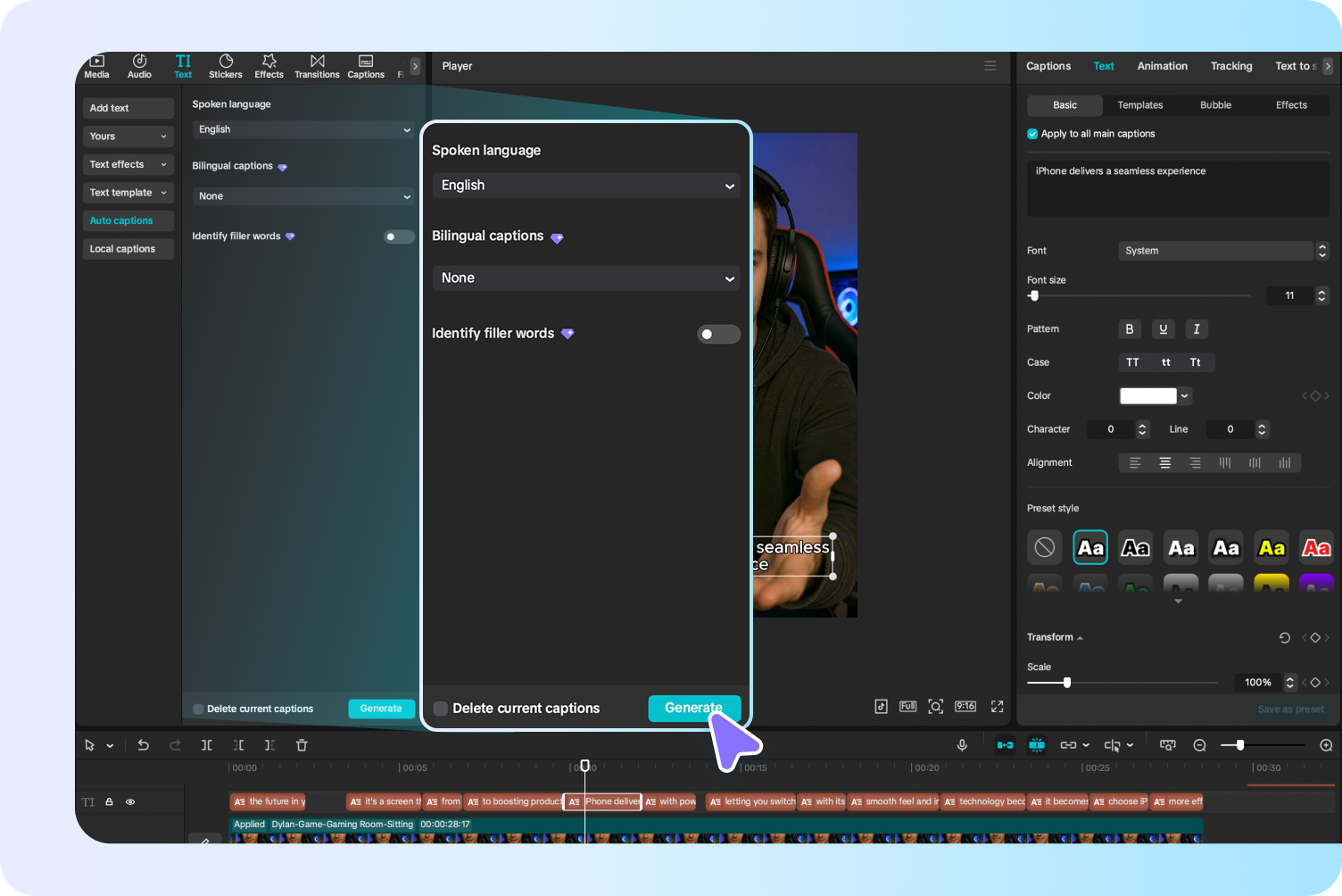
CapCut Caption Checklist
One Video = 5 Pieces of Content
The biggest mistake creators make: filming once, posting once, then starting over. Repurpose everything.
Full Video
Post the 60-second version on TikTok, Reels, and Shorts.
Quote Card
Screenshot the best frame. Add the quote as text. Post on Twitter/X and LinkedIn.
Audio Clip
Extract the audio. Post as a podcast snippet or voice note on WhatsApp Status.
Carousel
Turn the script into 5-7 slides. Post on Instagram and LinkedIn as a carousel.
Blog Post
Transcribe the video. Expand into a 500-word blog post. Embed the video.
The 30-Minute Repurposing Workflow
Your Day 3 Mission
Record and publish a 60-second brand intro video. Use the script formula. Film on your phone. Edit with CapCut. Add captions. Post it. Tag 3 friends who need to see it.
"The first video is always the hardest. The second is 50% easier. By the tenth, you will not remember why you were afraid. Start ugly. Start now. Start anyway."
Your Day 3 Deliverable
60s Brand Video
Published on TikTok, Reels, or Shorts
Captioned Version
Auto-captions corrected and styled
2 Repurposed Posts
Quote card + carousel from same video
Script Template
Saved for future 60-second videos
Complete this lesson
Mark as complete to track your progress